
When and How to Use UTM Parameters
Marketing happiness and how I learned to love the UTM


Our Beloved UTMs
UTM parameters have become a defacto standard for marketing traffic attribution for any URL used for marketing. That’s for a lot of great reasons including — they’re free.
It’s also pretty common to launch marketing campaigns on top of existing campaigns without passing down a way to consistently measure them with UTMs.
A lot of assumptions get made about marketing reports. GA and its supporters often get the blame for reporting being incorrect when it’s very possible that, innocently, no one was on-game about making sure tracking was happening by putting correctly formed UTM parameters on the landing page URLs when campaigns and ads were launched.
Sometimes UTMs are missing. Many times, sources and mediums are used interchangeably. That’s what I kindly refer to as, not awesome. I’ve seen this done by successful marketing agencies who have religious bias over their reason for calling Bing a medium. It’s incorrect because GA marketing reports don’t lie unless you ask them to.
Sometimes UTM parameters get used on links that are on a third party website, or on your own websites on internal links. Both are not what UTMs were designed for, and each will make analytics attribution reporting on marketing campaigns into a boiling mess of molten metal.
What are UTM parameters for and how do we use them?
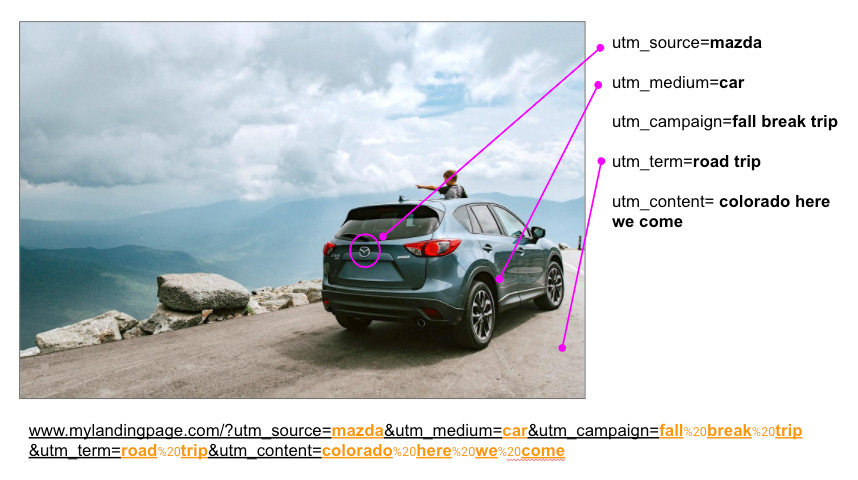
Let’s go on a road trip.
To go on a road trip, we need a way to get there: a car.
So we pick a car to drive: a Mazda.
We plan a time to go and a reason we’re doing our road trip: it’s fall break.
We look up all sorts of things to do under our search term: road trip.
Where are we going and what do we want to see? Colorado here we come.
utm_medium: the method we chose to travel on our road trip
utm_source: the type of car we chose to do our road trip
utm_campaign: our reason for doing the road trip, allowing us to categorize this road trip in comparison to others we will take in the future
utm_term: the name we’ll use to search for things to do or tell our friends what we’re doing so they can ask questions and be involved
utm_content: the main thing we’re going to go see - the contents of our trip
Paid Search Example
If instead, we were buying a keyword from Bing for cpc (paid search) traffic so that, when people searched for our road trip (term | keyword), they were presented with links that we provided that help them find information on our website — we would use the following values in our UTM parameters:
utm_medium: cpc
utm_source: bing
utm_campaign: fall break trip
utm_term: road trip
utm_content: colorado here we come
And this URL would be provided to Bing:
www.ourtravelwebsite.com/?utm_medium=cpc&utm_source=bing&utm_campaign=fall%20break%20trip&utm_term=road%20trip&utm_content=colorado%20here%20we%20come
Email Example
If we then decided to send a newsletter out through a mail service (e.g. Mailchimp) we may use the following UTMs:
utm_medium: email
utm_source: mailchimp
utm_campaign: fall break road trip
utm_content: colorado here we come
And our URL for Mailchimp would be:
www.ourtravelwebsite.com/?utm_medium=cpc&utm_source=mailchimp&utm_campaign=fall%20break%20road%20trip&utm_content=colorado%20here%20we%20come
Notice: we removed utm_term. Why?
Mailchimp doesn’t sell keywords (terms) so there is nothing to put here; they sell emails, and it’s up to us to provide UTM parameters that are meaningful. Plus, not ALL UTM parameters are always necessary.
Which UTM parameters are required, and which ones are optional?
Needed:
utm_medium
utm_source
utm_campaign
Optional:
utm_term
utm_content
Why are some needed and others optional?
This answer is specific to Google Analytics. GA classifies incoming traffic internally as source, medium, and campaign. It has decided that these are the hallmark trio that enables nearly every type of managed traffic to be tracked and given credit for user sessions on a site or app.
It’s also become a standard
Another standard to note: don’t switch values for utm_source and utm_medium. From our example, if you made utm_source = “car” and utm_medium = “mazda”, you’d be saying that all types of car are “car” and that there are no brands, and that the word used to describe the category of the thing that is indeed today known as a “car” is instead a singular brand name which is “Mazda”. All cars are Mazda, and “car” is all brands.
If we spoke that way we’d sound like this
I’m sure glad that you went to the Mazda wash today, and read Mazda and Driver magazine to pick out a new Mazda. What brand of Mazda do you want? A German or American one?
Sounds pretty limiting, and incorrect, and super weird like you’re Thor’s powerless cousin coming to the Earth and trying to fit in.
It works no better when you reverse these in UTM parameters, so… don’t do that. It makes your data weird, and none of it will ever resemble anything from Asgard.
What Does a Well Constructed URL with UTM Parameters Look Like?
It looks like any well-constructed URL with any other types of parameters. Here are the rules.
www.website.com/?utm_source=asource&utm_medium=amedium&utm_campaign=acampaign
Does it matter if you remove the ? and use only &?
Yes. Don’t do it.
A “?” separates your URI from your list of parameters, even if there is only one in that list. It’s the leader.
Something needs to be first, and whatever parameter is first after the last little bit of the URI path, a “?” must be used to separate the URI from the parameter
It tells browsers that a bunch of words coming up after that? are not part of the URL, and are not used to identify bits of the site.
Do I need to use this URL format even if I don’t have UTM parameters but I have other parameters?
Yes
Does order matter in UTM parameters or with any parameters on a URL?
No
Checking Out UTM Parameters in GA
This is pretty much the point of the whole exercise: making sure that you can attribute credit for user behavior on your website back to the traffic you managed that brought the customer to you.
Method A
When you’ve launched any campaign with UTM parameters, cut to the chase and go straight to the Source/Medium report in GA. It’s a very pure look at your traffic.
Acquisition —> All Traffic —> Source/Medium
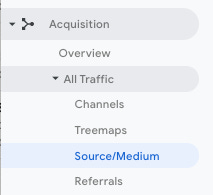
You’ll see your sources along with the mediums. Then you can choose a secondary dimension (campaign is a good choice) to see all three at once.
Note: organic, direct, and referral traffic won’t have a campaign. Can anyone tell me why? Add a comment at the end. 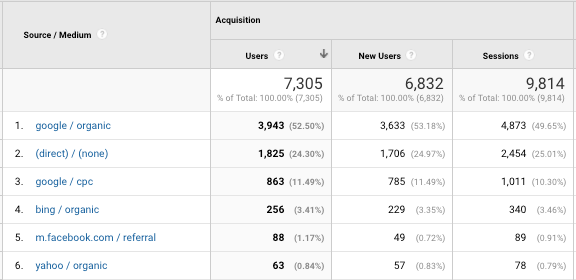
Notice google / cpc: this represents the UTM parameters utm_source=google, and utm_medium=cpc.
[Caveat: if auto-tagging is turned on in Google Ads, don’t use UTM parameters. Auto-tagging introduces the gclid parameter onto the URL which does a much better job of specifically tracking this traffic source and attributing in GA, and one of its benefits is that it automatically and correctly fills in cost import.]
Method B
The Channels report Acquisition —> All Traffic —> Channels breaks down a convenient view of traffic by medium. Each channel definition is configurable, and it appears in the Default Channel Grouping under view settings.
By default, the Default Channel Groupings are set to be automatically interpreted by GA with internal variables. This makes it a great place to test out your Mediums, and click through to the Sources coming through them, and then to your campaigns.
Channel “Other” Tip:
The Channel “Other” is the bucket of lost toys. It’s a bit bucket (for hardware people).
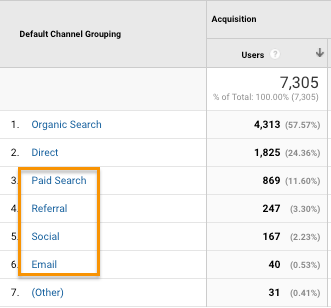
“(Other)” a great place to dive into to find and rework problematic attribution situations because it’s where all landing URLs find themselves when they don’t fit in with the rest of the Channel definitions. This can be because 1. there need to be more channel definitions that identify your utm_mediums specifically (so create them), or 2. these URLs are broken and the UTM parameters aren’t being realized, or 3. Google had a problem with these (rare).
Channel Referral Tip:
Use the Referrals channel grouping to identify traffic that you will want to tag with UTMs because although it’s coming in as referral, you know that it was a post or an email or some other managed traffic that you can tag. If you can tag it, do tag it.
A quick way to find messed up URLs in your GA data.
In Behavior, click on Landing Page reports; enter “UTM” into the filter, and hit return.
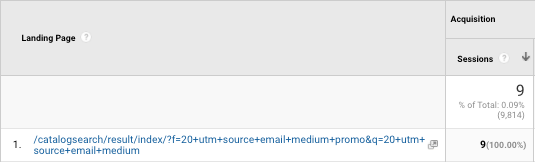
If you see ANY results, those landing pages are not awesome. This example above shows how some “+” signs made it into the URL instead of “_” in the UTM parameter names, and there are no “&” separators between UTM parameters. Both things killed this URL. How do we know it’s useless for our intended attribution purposes?
UTM parameters are removed from a landing page URL by GA on arrival. The job of a UTM parameter is to fill in the nooks and crannies (where did that term come from?) in your attribution data: source, medium, keyword, campaign, content.
When the URL is busted due to incorrect configuration, sometimes GA doesn’t see those UTMs and they aren’t incorporated in GA reporting.
Takeaways
UTM parameters are awesome. Use them wisely, and predictably.
Make sure that you write down a set of your own rules (not guidelines) for naming your Mediums, Source, and Campaigns at a minimum.
Use lowercase when providing values to UTM parameters in your URLs. It’s a good practice.
Also in GA View Settings, add Lowercase Filters for Campaign Source, Campaign Medium, and Campaign Name. This prevents cardinality and makes your reporting life a happy one.
Investigate UTM parameters continually. This is not Ronco (see here). You may not set it and forget it, ever. There are too many cooks in the kitchen in terms of people’s hands on the creation of marketing URLs, and each hand creates 1 * n chances to mess up a URL. It’s human nature to forget how to do something, and we don’t mind-meld so, make a standard and apply it throughout your organization without remorse.
Your ardency will yield excellence in answering the question: “what did we actually accomplish with that marketing we launched, and what did people do on our site as a result of landing there from that traffic?”.
If you want my UTM tracking sheet that automatically creates and stores your Landing Page URLs, ask me on my webform www.wonkydata.com/contact-us.
Peace.

#marketing #paidmarketing #social #analytics #digitalmarketing #wonkydata #marketingattribution
Thanks Chris! Really got some beneficial ways to look at my traffic. Keep putting it out there.